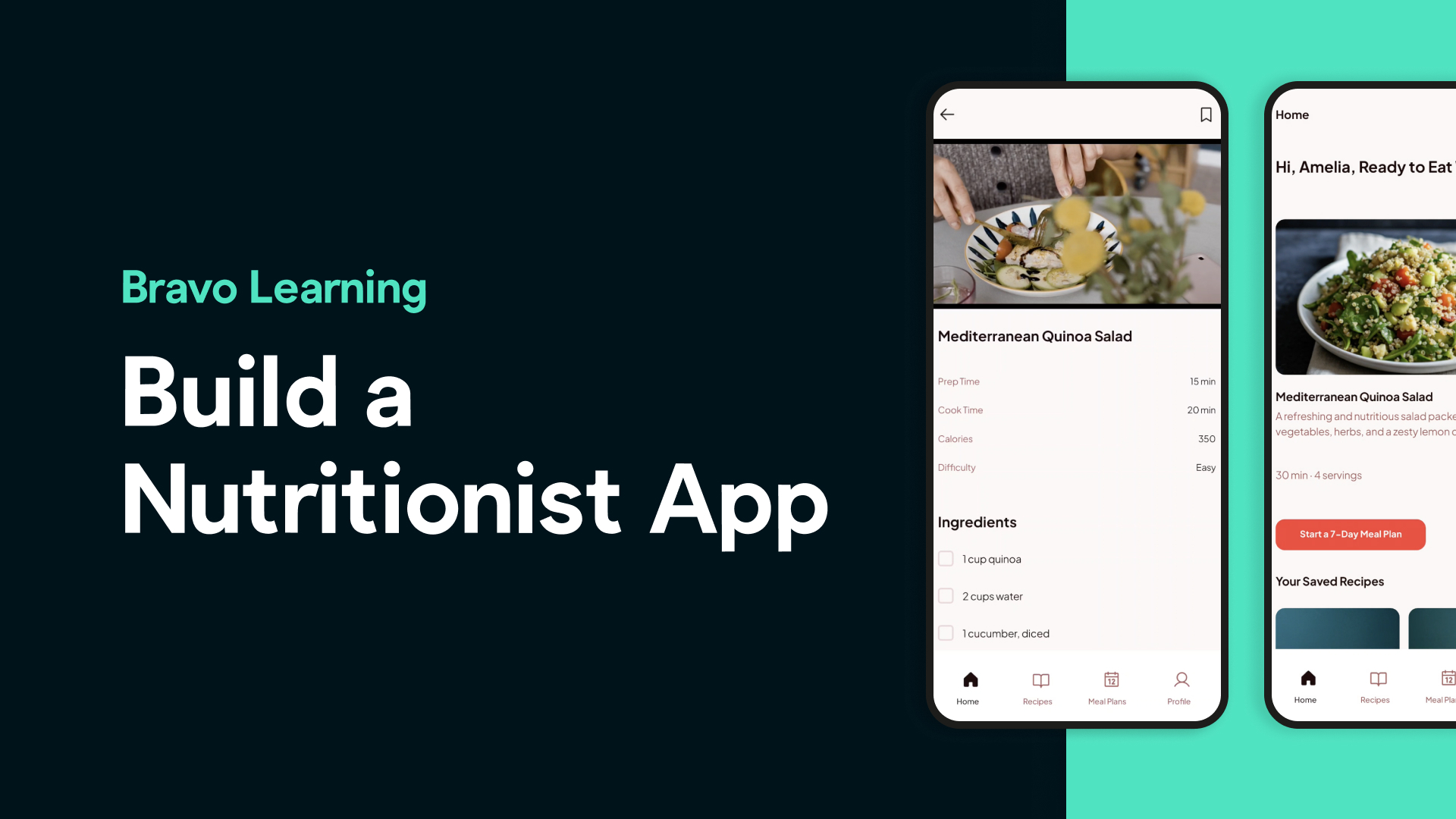
Are you a nutritionist, wellness coach, or food content creator with tons of videos, meal plans, and healthy recipes — but no mobile app to share it all?
What if you could turn your recipes, cooking tutorials, and nutrition tips into a sleek, professional mobile app... in just a few hours — and without writing a single line of code?
In this blog post, we’ll show you how we built a fully functional nutrition coaching app using Stitch by Google, Figma, Bravo Studio, and a few powerful integrations.
Let’s walk you through every step. 👇
🧠 Step 1: Design Your App with AI in Stitch by Google
We started with Stitch by Google, a free AI-powered app design tool.
We prompted Stitch to generate a clean, wellness-friendly Nutritionist & Healthy Recipes app design. Our layout included:
A welcome screen
A login page
A recipe video library
A featured section for top-rated or seasonal recipes
A coach profile and tips section
This gave us a solid, visually appealing starting point.
🎨 Step 2: Customize the UI in Figma
Once we had our Stitch design ready, we exported the screens to Figma.
Here we:
Adjusted colors, fonts, and layouts to reflect a clean, plant-based aesthetic
Organized the UI elements for better readability and usability
Added icons and images to create a more engaging food-focused experience
We also designed a custom app icon to give the app a unique, branded look.
🏗️ Step 3: Structure the App with Bravo Tags
With the Bravo Studio Figma plugin, we added Bravo Tags to key screens like the login page and video screens.
These tags tell Bravo Studio how to interpret your design for real-world app functionality — like login, web views, navigation, and dynamic content.
We connected our screens using Figma prototyping to map out the user journey from login to content browsing.
🚀 Step 4: Turn Your Figma Design Into a Real App in Bravo Studio
Time to bring the design to life.
We imported the Figma file into Bravo Studio, which instantly transformed it into a real mobile app for iOS and Android — no code needed.
We used the Bravo Vision app to test and preview our new app in real-time.
🎥 Step 5: Add Video Content with a Custom Player
To share our healthy cooking tutorials, we embedded a custom video player into the app using Bravo’s Web View tag.
This player connects directly to your hosted videos (e.g., YouTube, Vimeo, Bunny.net), allowing users to stream your content inside the app.
This is perfect for creators with existing video libraries.
🔐 Step 6: Add User Authentication with Kinde + Xano
To control access to exclusive content, we integrated secure user login using:
Kinde for authentication
Bravo’s external OAuth snippet
Xano as our backend
Only registered or paying users can access premium recipes and videos.
🧩 Step 7: Backend with Xano — No Code Required
We used Bravo’s Xano snippet to manage:
User accounts
Video sessions
Content access
This way, we didn’t have to write backend logic from scratch — just connect, configure, and launch.
💸 Step 8: Monetize with RevenueCat (Optional)
Ready to turn your passion into a business?
We integrated RevenueCat to enable in-app purchases and subscriptions. This gives you full control over:
Subscription models
Free vs. premium content
Revenue tracking
You can also use Kinde Billing if you’re already set up with their platform.
🎉 You’re Done — Launch & Grow Your Brand
That’s it! In just a few hours, we created a powerful mobile app for nutritionists and food creators — with:
✅ AI-powered UI design ✅ Real video content ✅ Secure login ✅ Monetization options ✅ Zero code
Whether you’re sharing meal plans, nutrition coaching, or food education, Bravo Studio gives you the tools to scale your impact with a mobile app.
👩🍳 FAQs
**Do I need coding experience to build this app?**
No! The entire process uses no-code tools like Bravo Studio, Stitch, and Xano.
**Can I sell access to my recipes or videos?**
Yes — using RevenueCat or Kinde Billing, you can monetize your app through subscriptions or one-time purchases.
**Where do I host my videos?**
You can host videos on YouTube, Vimeo, Bunny.net, or any video CDN, and embed them with Bravo’s Web View feature.
**Is the app available for both iOS and Android?**
Yes. Bravo Studio compiles your app for both platforms.
**What kind of content works best for this type of app?**
Video tutorials, recipe walkthroughs, nutrition plans, shopping lists, and exclusive coaching tips.
Ready to turn your healthy recipes into a mobile experience?
Let’s make your brand mobile!